01
Pick a target
Choose a target photo to begin.
 FaceEnjoy
Create single and multi-face photo swaps on your device. Pick a photo, map the faces, and choose whether to save or share your result.
●Android · Google Play review in progress · iOS coming soon

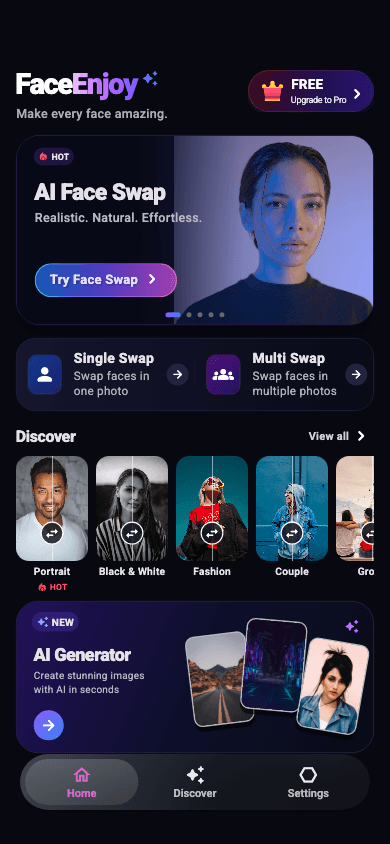
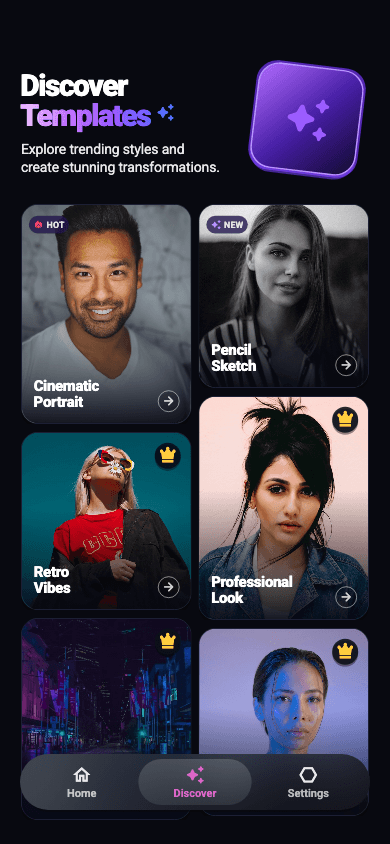
HOW IT WORKS
Choose a target photo to begin.
FaceEnjoy detects faces automatically. Map one source—or one for each person.
Generate with the local face engine, then preview, save, or share.
BUILT FOR REAL CREATION
A focused set of tools that takes you from photo selection to a shareable result without turning creation into a complicated workflow.

One source face and one target image. A simple, guided flow for a photo face swap.
Detect multiple faces in one scene and assign a different source photo to each person.
Face detection and composition run on your device. Custom target safety checks upload a minimized image only after your consent.
Preview your creation, save it to your photo library, or open the system share sheet.
THE FACEENJOY DIFFERENCE
FaceEnjoy finds the complete faces in a group scene, numbers them clearly, and lets you choose a different source for each person before generating locally.
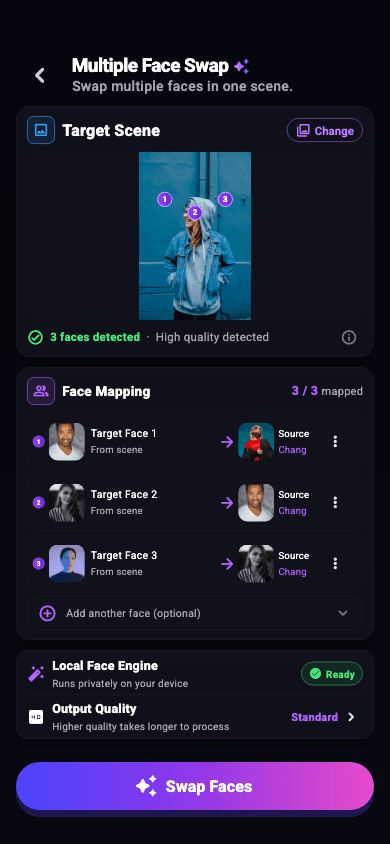 →
→ MAPPED
 →MAPPED
 →READY
PRIVACY, MADE VISIBLE
Face detection and face-swap composition run on your device. With your consent, a minimized copy of a custom target photo is uploaded to Alibaba Cloud Green in Singapore for content-safety inspection. A result is uploaded only if you choose Report and separately agree for that report. First use may also require internet access to download the local face engine.
ANDROID · GOOGLE PLAY REVIEW
Android offers an online template catalog. These images illustrate creative styles; the available selection may differ. The current iOS app has no remote template catalog.
01020304 05
05iOS · ANDROID
The Android app is under Google Play review and the iOS app is being prepared for public release. The App supports 12 interface languages: English, 简体中文, 繁體中文, 日本語, 한국어, Русский, Français, Deutsch, Español, Português, العربية, Italiano.
GOOD TO KNOW
Face-swap composition stays on your device. After permission, a minimized copy of a custom target photo—or a reported result after separate permission for that report—is sent to Alibaba Cloud Green in Singapore for content safety. Source photos and built-in examples are not uploaded. Alibaba normally keeps the temporary image for about 30 minutes; FaceEnjoy may keep a one-way digest and inspection result for up to 7 days. A separate feedback image is uploaded to private Cloudflare R2 for up to 30 days only if you expressly add one.
The app may need to download and prepare the local face engine before your first creation. Wi-Fi is recommended.
Yes. FaceEnjoy can detect multiple complete faces in one target scene and lets you map a different source to each one.
Use clear, front-facing, well-lit photos with complete facial features. Extreme angles, dark lighting, or occlusion may reduce detection quality.
Yes. Results can be previewed, saved to your photo library, or shared through the system share sheet.
The current iOS app offers on-device photo face swapping and a built-in portrait example, without AI image generation or a remote template catalog. The Android app offers AI image generation and an online template catalog. Video face swapping is not available.
YOUR NEXT FACE
The Android release is under Google Play review and the iOS app is being prepared.
View launch status